How a POS Transaction Works: From Item Scan to Reconciled Sale
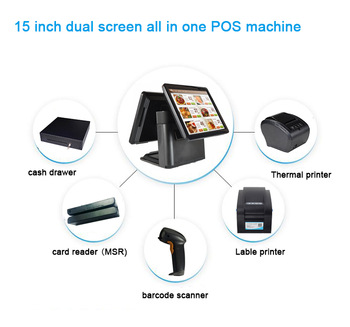
Follow a transaction through the POS terminal, business software, payment service and receipt printer, and understand what each part actually does.
A POS machine is the physical device used at the point of sale; a POS system is the wider combination of hardware, software and connected services. The terminal may display the basket and run the application, but a separate provider commonly authorizes electronic payments. Understanding these boundaries makes purchasing and troubleshooting much easier.

Follow the information, not just the screen
- Item entry: a scanner supplies a code or a cashier selects an item; the application looks up its price and applicable rules.
- Basket calculation: software applies quantity changes, discounts and configured taxes, then shows the total.
- Payment: the selected payment workflow requests authorization or records cash according to the merchant's setup.
- Completion: after a confirmed result, the application records the sale, updates relevant stock records and issues a receipt.
- Reconciliation: closing reports compare recorded sales with cash and payment-provider records.
What the hardware contributes
The touchscreen provides the working interface, the computer runs supported applications, and connected peripherals capture or output information. A fast processor cannot compensate for an unavailable payment service. Likewise, connecting a scanner does not create an inventory database. Software must interpret the input and implement the retailer's rules.
What to test before opening
Run a sale, a cancellation, a return and a shift close using the intended devices. Also test uncertain payment results and interrupted connections, following the provider's recovery procedure instead of charging again blindly. Confirm who supports each component so staff can distinguish a terminal fault from an application, network or acquiring issue when the counter is busy.