A200-Z Windows POS: A Pre-Purchase Review for Checkout Integration
Evaluate the A200-Z as part of a complete Windows checkout station, with attention to software requirements, peripherals and the final approved hardware build.
The A200-Z has been presented as a Windows all-in-one POS option. For a purchasing team, the model name is a starting point rather than a complete specification. Screen format, computing components, supported operating-system edition and peripheral interfaces should be confirmed for the actual unit being offered.

Describe the checkout workload first
List the applications that will run simultaneously, the size of any local product database and whether reports are generated on the terminal. Ask the software provider for supported drivers and recommended resources. A browser-only application and a local retail database can place very different demands on what appears to be the same checkout machine.
Inspect the proposed workstation
- Check the display layout using the real sales screen, including long item names and keyboard entry.
- Connect the intended scanner, receipt printer, drawer, payment terminal and customer display.
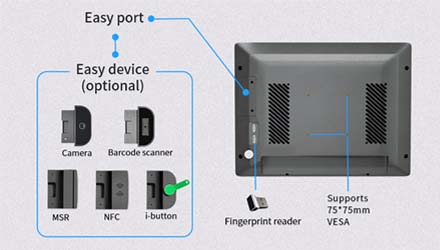
- Verify the port map, power-adapter specification and counter clearance against the installation plan.
- Confirm the operating-system licence, update path and recovery-image procedure in writing.
- Record the supplied motherboard, memory and storage so later orders can match the approved sample.
Agree on acceptance and support
Use a full trading-cycle test rather than a demonstration with an empty application. Include a return, paper replacement, restart and network interruption. Ask zwdpos to identify current A200-Z options and any substitutions before ordering. Written configuration and support terms are more useful than broad promises of speed or suitability for every industry, particularly when the terminal will be deployed across several locations.