Selecting a POS Motherboard: Ports, Lifecycle and Thermal Fit
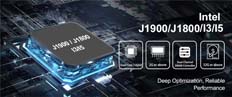
Evaluate the motherboard as an integration platform, covering interfaces, power, operating-system support and long-term replacement compatibility.
A POS motherboard determines much more than processor performance. It influences available interfaces, display outputs, cooling, operating-system support and the ability to reproduce a configuration later. Begin with a peripheral and software map before selecting the board, particularly when replacing one inside an established enclosure.

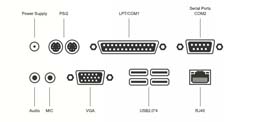


Check the electrical and mechanical fit
Confirm board dimensions, mounting points, power input, cooling clearance and internal connector positions. Serial ports may have different electrical modes or optional powered pins, so verify the exact pinout and device requirements. A connector that fits does not establish electrical compatibility. Internal replacement should be performed only by authorized personnel using the manufacturer's documentation.
Verify support for the complete workstation
- Confirm drivers for the exact operating-system edition and processor architecture.
- Check the number and behavior of display outputs, including customer-display recovery after restart.
- Reserve sufficient ports for scanner, printer, payment and maintenance devices.
- Evaluate firmware settings, recovery behavior and approved storage interfaces.
- Ask about board revision tracking, lifecycle and notice before substitutions.
Validate the assembled terminal
Test the board inside its final enclosure under the actual application workload. Monitor temperature, throttling and peripheral stability during extended operation. Save the firmware configuration and record the approved revision. Selecting a board on processor name or port count alone misses the constraints that determine whether a compact POS will remain stable and serviceable across repeated production batches.