Fanless POS Lifecycle Planning: Cleaning, Heat and Replacement Choices
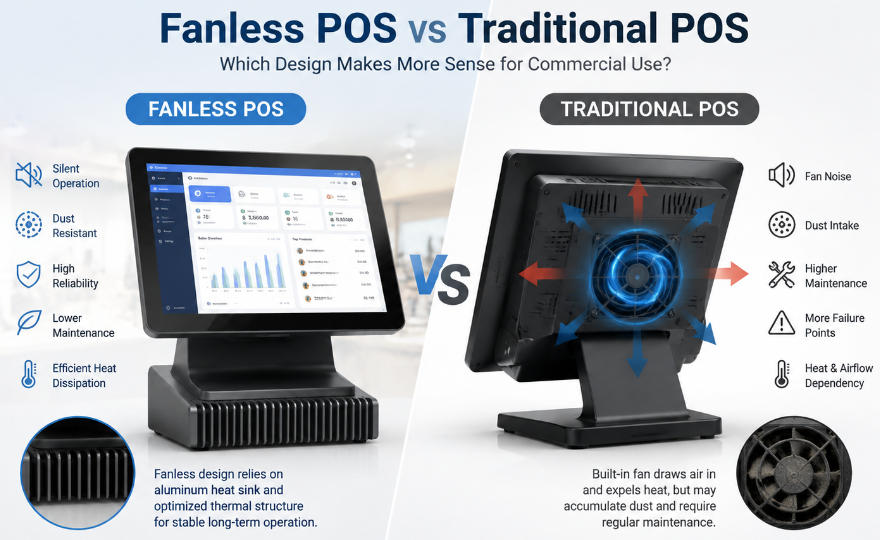
Assess a fanless POS through long-term maintenance and thermal constraints instead of assuming the absence of a fan eliminates service needs.
Fanless terminals remove a moving cooling component, but they still need a suitable thermal path and maintenance plan. Heat must leave the enclosure, connectors still wear and dust can collect around equipment. Evaluate the design over its expected working conditions rather than treating fanless as a synonym for maintenance-free.

Review the installed thermal path
Check ambient limits, mounting and required clearance around heat-dissipating surfaces. Avoid enclosing the unit in a cabinet or placing it beside a heat source without supplier approval. Measure behavior with the actual application during a representative busy period. A processor that throttles under sustained load may affect response even though the terminal remains powered on.
Plan the service routine
- Use approved surface cleaning and inspect cable strain relief.
- Review storage health, power adapters and repeated temperature events.
- Confirm which parts can be replaced locally and which need authorized service.
- Keep the approved image and compatible spares available.
- Reassess conditions when the counter layout or software workload changes.
Compare against the alternative honestly
A well-maintained fan-cooled design may be appropriate for a higher sustained workload; a fanless design may simplify some environments. Compare fault records, cleaning effort and recovery costs for the actual candidates. Choose the cooling architecture that remains stable and serviceable at the site rather than making an unsupported prediction about which will last longer everywhere.