AP14D Dual-Screen POS: Configuration Questions for Retail Buyers
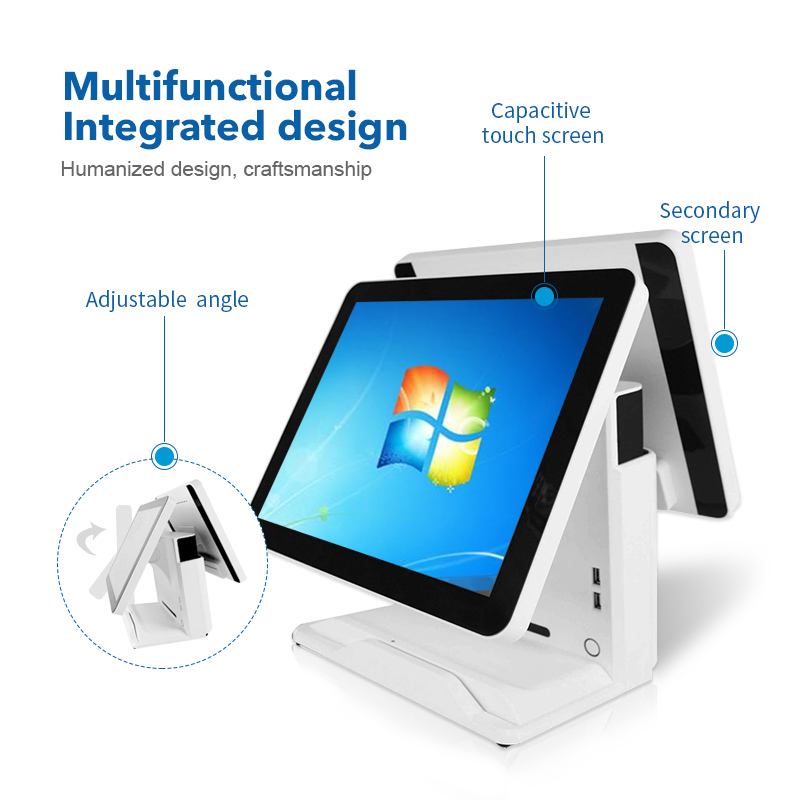
Evaluate the AP14D's cashier and customer displays, application requirements and optional modules without assuming legacy operating systems suit a new deployment.
The AP14D is described as a dual-screen POS terminal for staff-assisted retail and hospitality checkout. The important buying question is not simply whether it has two screens, but whether both screens serve a clear purpose in the selected application. A customer display only shows live items, totals or promotions if the software supports that output.

Resolve display details before approving a sample
Earlier material describes a 15-inch main touchscreen and different secondary-screen options, while its opening description implies a fixed dual-15-inch arrangement. Ask for a configuration drawing and current quotation that identify both panels, resolutions, touch capability and mounting positions. Check customer readability and privacy from standing and seated positions at the actual counter.
Replace legacy assumptions with a supported build
- Confirm the processor generation, memory, SSD and motherboard revision rather than relying only on a processor family name.
- Older listings mention Windows 7, 8 and 10. Verify a supported operating-system edition and update plan before any new installation.
- List required scanners, printers, payment devices and optional readers, then validate their drivers on that image.
- Test recovery after power loss and ensure each application window returns to the correct display.
Document the final configuration
Options such as NFC, cameras and Wi-Fi should be quoted and tested individually; their appearance in an older article does not make them standard equipment. Keep the approved sample details with the purchase order, including support responsibilities and replacement compatibility. This makes the AP14D evaluation useful for repeat orders rather than depending on a broad promotional feature list.