All-in-One POS or Cash Register: Choose by Record-Keeping Needs
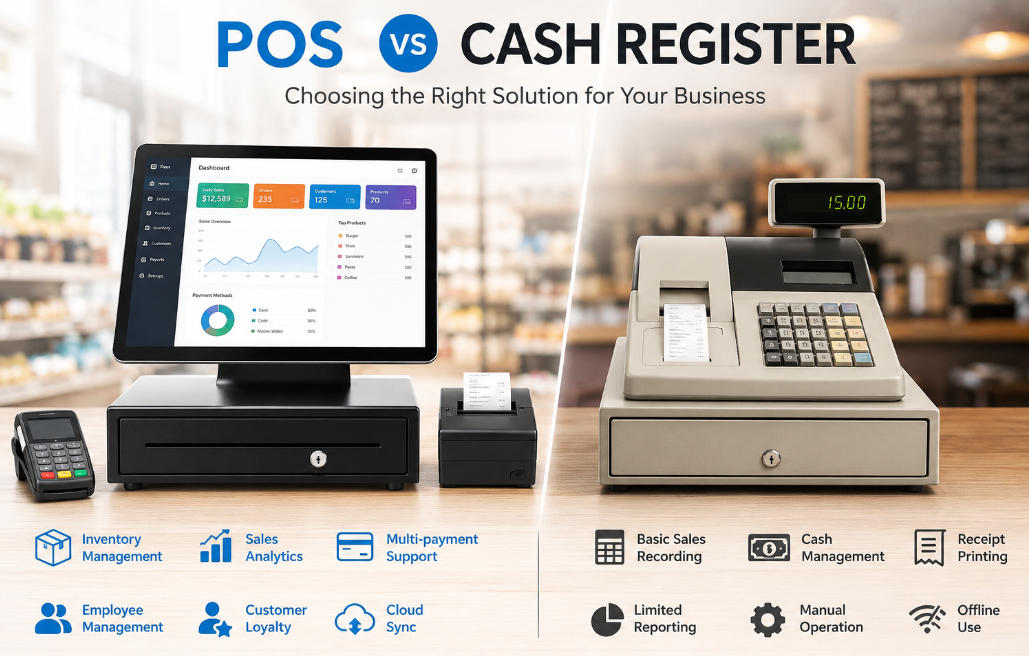
Compare a basic register and an all-in-one POS through product complexity, inventory, reporting and the effort of operating the complete system.
A traditional cash register can suit a simple business with limited recording requirements. An all-in-one POS adds a computing platform for more capable software, but also introduces updates, licences and support dependencies. The decision should follow what the business needs to record and control, not an assumption that newer equipment is always necessary.

Identify the limits of the current process
Count product variations, price changes, returns and time spent reconciling records. Determine whether inventory and reporting are handled elsewhere and whether duplicate entry causes errors. If the current register meets the requirements reliably, replacement may be unnecessary. If information must be shared across users or locations, suitable software may justify a broader POS platform.
Compare the complete arrangements
- Register: examine programming effort, receipt detail and export limitations.
- POS: examine application support, peripherals, permissions and data ownership.
- Both: confirm payment-provider integration or the separate payment process.
- Include training, consumables, subscriptions and recovery in cost estimates.
- Check how each setup handles a failed printer, power interruption and disputed transaction.
Approve the change through a trial
Use actual products and staff to test a complete shift. Record improvements and new support work. Preserve required historical records and plan the migration carefully. The right choice is the simplest supported arrangement that satisfies the business's record-keeping and service needs, not a blanket judgment against every basic register.